






Table of contents:


John Adams is a podcast host, health coach, content creator, and tech enthusiast helping people build sustainable lifestyles and grow their creative platforms.
John Adams hosts the Health, Tech & Wellness Podcast and created Living 95, a framework for building sustainable, balanced lifestyles. After losing 111 pounds and reversing major health issues, he now shares practical strategies for lasting health, along with content on tech, podcasting, and growing a YouTube channel from scratch.
Youtube: youtube.com/@John-H-Adams
Facebook: facebook.com/john.adams.5201
Instagram: instagram.com/htwwithjohnhadams
Explore’s John’s studio:
.webp)
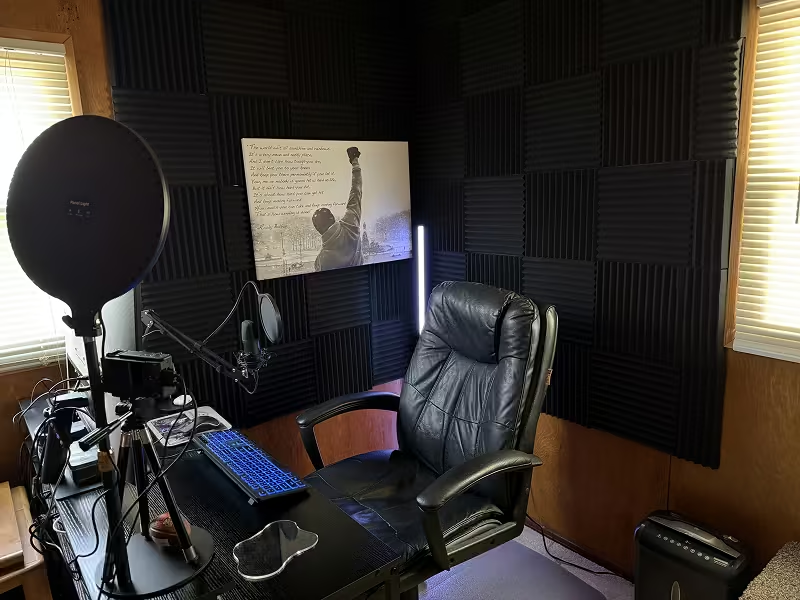


My gear:
- Base M4 Mac mini
- Sony - ZV-1F
- Elgato - Cam Link 4K
- 10.2” Ring Light for Desk = Key Light
- MAONO (AU-A04H) Microphone and MAONO Headset combo
- Huuger 47 Inch Computer Desk with Power Outlets and LED Lights
- Focusound Acoustic Foam Panels
- Riverside
- Rocky Inspirational Canvas = Basically my life and Podcast/Community motto.
The last thing I’ve added to my setup:
M4 Mac Mini
My biggest learning:
Your first videos will not be perfect! Your first videos will not go viral! And that’s 100% ok!!! Just make sure you are talking about something you are passionate about because if not those 3 facts I just gave will beat you to your knees! So just remember the quote from the Rocky Canvas I have in my studio and those 3 facts and you will make it!!!!
Why I started:
To pay forward my new health and life I have gained and help others to live a happier healthier life!
Want us to feature your studio? Fill out this form and send it over!


